Userlookup Tutorial
This tutorial will help you make your own userlookups. It is quite simple to do and all you have to really do is make the banner and keep the credit in the coding.
Here is the coding:
Editing the Coding
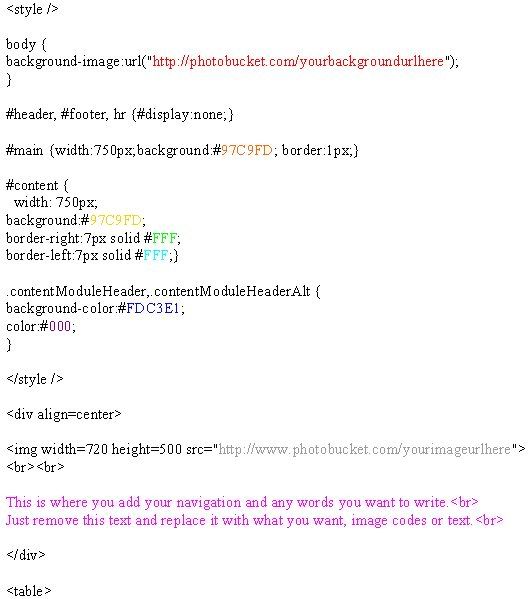
Red
This is where you put your background url. It it a repeating background so it can be any size.
Gold & Yellow
This is the color of the main table background.
The part that is behind your stats modules. You can google HEX COLOR CHART for the colors you can use. HERE
Green & Light Blue
This is the color of the content borders left and right.
You can google HEX COLOR CHART for the colors you can use. HERE
Dark Blue
This is the color of the background behind each module heading.
You can google HEX COLOR CHART for the colors you can use. HERE
Purple
This is the color of the text for each module heading.
You can google HEX COLOR CHART for the colors you can use. HERE
Gray
This is where you put the banner url the size of it is 720 x 500 pixels. If you want to change the sizes just change the width and height code.
Pink
This is where you can add some navigation, text or any other content you wish to have.
There are tons of petpages with icons, buttons or adoptables to express yourself with.
Just remove the text in red and type your own stuff or add image codes.